
| 일 | 월 | 화 | 수 | 목 | 금 | 토 |
|---|---|---|---|---|---|---|
| 1 | ||||||
| 2 | 3 | 4 | 5 | 6 | 7 | 8 |
| 9 | 10 | 11 | 12 | 13 | 14 | 15 |
| 16 | 17 | 18 | 19 | 20 | 21 | 22 |
| 23 | 24 | 25 | 26 | 27 | 28 | 29 |
| 30 | 31 |
- mysql
- 디자인교육
- 부트캠프
- 백엔드개발자
- UXUI챌린지
- 시스템설계
- 국비지원교육
- 디자인강의
- 티스토리챌린지
- Java
- UXUI기초정복
- JPA
- 백엔드 부트캠프
- baekjoon
- 오블완
- API
- KDT
- 패스트캠퍼스
- 내일배움카드
- 오픈패스
- Spring
- Be
- 백준
- 국비지원
- OPENPATH
- 국비지원취업
- 디자인챌린지
- 오픈챌린지
- UXUIPrimary
- 환급챌린지
- Today
- Total
군만두의 IT 개발 일지
[스터디7] 07. REST 엔드포인트 사용 본문
목차
11장. REST 엔드포인트 사용
이 장에서 다룰 내용
- 스프링 클라우드 OpenFeign으로 REST 엔드포인트 호출하기
- RestTemplate으로 REST 엔드포인트 호출하기
- WebClient로 REST 엔드포인트 호출하기

- OpenFeign: 스프링 클라우드(Spring Cloud) 프로젝트에서 제공하는 도구.
- RestTemplate: 스프링 3부터 개발자들이 REST 엔드포인트를 호출하는 데 사용하여 널리 알려진 도구. 저자는 새로운 앱에서 작업한다면 RestTemplate 대신 OpenFeign을 추천함.
- WebClient: RestTemplate의 대안으로 제시된 스프링 기능. 리액티브 프로그래밍(reactive programming)이라는 다른 프로그래밍 방식을 사용함.
11.1 스프링 클라우드 OpenFeign으로 REST 엔드포인트 호출
- OpenFeign을 사용하면 개발자는 인터페이스만 작성하고 이 도구가 구현을 제공한다.
- 메서드에 애너테이션을 추가하여 경로, HTTP 메서드, 매개변수, 헤더 및 요청 본문을 정의한다.
- 메서드를 직접 구현할 필요가 없다.

OpenFeign으로 엔드포인트를 노출하는 앱을 구현한다.
1. pom.xml 파일에 의존성을 정의하면 프록시 인터페이스(OpenFeign 클라이언트)를 만들 수 있다.
<?xml version="1.0" encoding="UTF-8"?>
<project xmlns="http://maven.apache.org/POM/4.0.0" xmlns:xsi="http://www.w3.org/2001/XMLSchema-instance"
         xsi:schemaLocation="http://maven.apache.org/POM/4.0.0 https://maven.apache.org/xsd/maven-4.0.0.xsd">
    <modelVersion>4.0.0</modelVersion>
    <parent>
        <groupId>org.springframework.boot</groupId>
        <artifactId>spring-boot-starter-parent</artifactId>
        <version>3.2.5</version>
        <relativePath/> <!-- lookup parent from repository -->
    </parent>
    <groupId>com.example</groupId>
    <artifactId>sq-ch11-ex1</artifactId>
    <version>0.0.1-SNAPSHOT</version>
    <name>sq-ch11-ex1</name>
    <description>Demo project for Spring Boot</description>

    <properties>
        <java.version>17</java.version>
        <spring-cloud.version>2023.0.1</spring-cloud.version>
    </properties>

    <dependencies>
        <dependency>
            <groupId>org.springframework.boot</groupId>
            <artifactId>spring-boot-starter-web</artifactId>
        </dependency>
        <dependency>
            <groupId>org.springframework.cloud</groupId>
            <artifactId>spring-cloud-starter-openfeign</artifactId>
        </dependency>
        <dependency>
            <groupId>org.wiremock</groupId>
            <artifactId>wiremock-standalone</artifactId>
            <scope>test</scope>
        </dependency>
        <dependency>
            <groupId>org.springframework.boot</groupId>
            <artifactId>spring-boot-starter-test</artifactId>
            <scope>test</scope>
        </dependency>
    </dependencies>

    <dependencyManagement>
        <dependencies>
            <dependency>
                <groupId>org.springframework.cloud</groupId>
                <artifactId>spring-cloud-dependencies</artifactId>
                <version>${spring-cloud.version}</version>
                <type>pom</type>
                <scope>import</scope>
            </dependency>
        </dependencies>
    </dependencyManagement>

    <build>
        <plugins>
            <plugin>
                <groupId>org.springframework.boot</groupId>
                <artifactId>spring-boot-maven-plugin</artifactId>
            </plugin>
        </plugins>
    </build>

</project>
2. 인터페이스에 @FeignClient 애너테이션을 추가하여 이 계약에 대한 구현을 제공해야 한다고 OpenFeign에 지시한다.
(환경마다 달라질 수 있는 URI 및 기타 세부 정보는 항상 프로퍼티 파일에 저장하고 앱에 하드코딩해서는 안 된다.)
package com.example.proxy;

import com.example.model.Payment;
import org.springframework.cloud.openfeign.FeignClient;
import org.springframework.web.bind.annotation.PostMapping;
import org.springframework.web.bind.annotation.RequestBody;
import org.springframework.web.bind.annotation.RequestHeader;

@FeignClient(name = "payments", url = "${name.service.url}")
public interface PaymentsProxy {

  @PostMapping("/payment")
  Payment createPayment(
      @RequestHeader String requestId,
      @RequestBody Payment payment);

}
3. 구성 클래스에 @EnableFeignClients 애너테이션을 추가하여 OpenFeign 클라이언트를 활성화한다.
package com.example.config;

import org.springframework.cloud.openfeign.EnableFeignClients;
import org.springframework.context.annotation.Configuration;

@Configuration
@EnableFeignClients(basePackages = "com.example.proxy")
public class ProjectConfig {
}
4. 정의한 인터페이스(2단계)에 FeignClient 클라이언트를 주입한다.
package com.example.controllers;

import com.example.model.Payment;
import com.example.proxy.PaymentsProxy;
import org.springframework.web.bind.annotation.PostMapping;
import org.springframework.web.bind.annotation.RequestBody;
import org.springframework.web.bind.annotation.RestController;

import java.util.UUID;

@RestController
public class PaymentsController {

  private final PaymentsProxy paymentsProxy;

  public PaymentsController(PaymentsProxy paymentsProxy) {
    this.paymentsProxy = paymentsProxy;
  }

  @PostMapping("/payment")
  public Payment createPayment(
      @RequestBody Payment payment
      ) {
    String requestId = UUID.randomUUID().toString();
    return paymentsProxy.createPayment(requestId, payment);
  }
}
cURL 명령을 실행하면 다음과 같이 응답을 확인할 수 있다.
curl -X POST -H 'content-type:application/json' -d '{"amount":1000}' http://localhost:9090/payment{"id":"1c518ead-2477-410f-82f3-54533b4058ff", "amount":1000.0}11.2 RestTemplate으로 REST 엔드포인트 호출
- 호출을 정의하는 단계
- HttpHeaders 인스턴스를 생성 및 구성하여 HTTP 헤더를 정의한다.
- 요청 데이터(헤더와 본문을 나타내는 HttpEntity 인스턴스를 생성한다.
- exchange() 메서드를 사용하여 HTTP 호출을 전송하고 HTTP 응답을 수신한다.
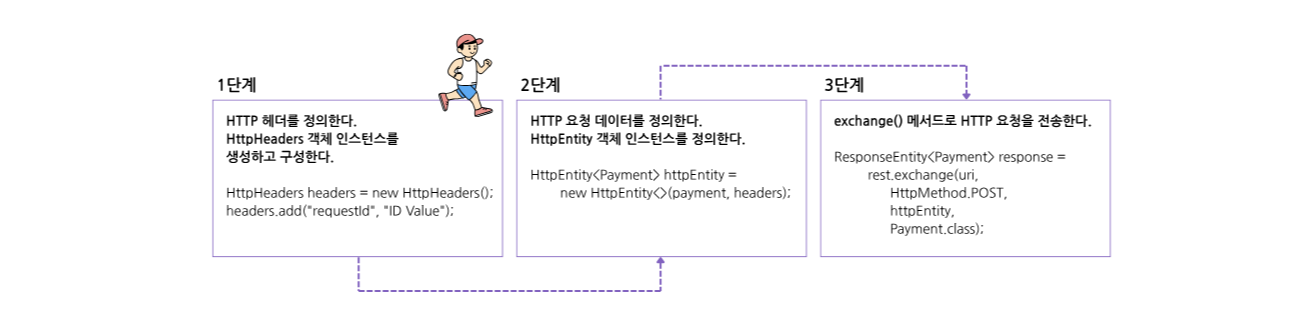
1. /payment 엔드포인트를 호출하는 앱의 프록시 클래스를 정의한다.
package com.example.proxy;

import com.example.model.Payment;
import org.springframework.beans.factory.annotation.Value;
import org.springframework.http.HttpEntity;
import org.springframework.http.HttpHeaders;
import org.springframework.http.HttpMethod;
import org.springframework.http.ResponseEntity;
import org.springframework.stereotype.Component;
import org.springframework.web.client.RestTemplate;

import java.util.UUID;

@Component
public class PaymentsProxy {

  private final RestTemplate rest;

  @Value("${name.service.url}")
  private String paymentsServiceUrl;

  public PaymentsProxy(RestTemplate rest) {
    this.rest = rest;
  }

  public Payment createPayment(Payment payment) {
    String uri = paymentsServiceUrl + "/payment";

    HttpHeaders headers = new HttpHeaders();
    headers.add("requestId", UUID.randomUUID().toString());

    HttpEntity<Payment> httpEntity = new HttpEntity<>(payment, headers);

    ResponseEntity<Payment> response =
        rest.exchange(uri,
            HttpMethod.POST,
            httpEntity,
            Payment.class);

    return response.getBody();
  }
}
2. 구현을 테스트하는 컨트롤러 클래스를 정의한다.
package com.example.controllers;

import com.example.model.Payment;
import com.example.proxy.PaymentsProxy;
import org.springframework.web.bind.annotation.PostMapping;
import org.springframework.web.bind.annotation.RequestBody;
import org.springframework.web.bind.annotation.RestController;

@RestController
public class PaymentsController {

  private final PaymentsProxy paymentsProxy;

  public PaymentsController(PaymentsProxy paymentsProxy) {
    this.paymentsProxy = paymentsProxy;
  }

  @PostMapping("/payment")
  public Payment createPayment(
      @RequestBody Payment payment
      ) {
    return paymentsProxy.createPayment(payment);
  }
}
cURL 명령을 실행하면 다음과 같이 응답을 확인할 수 있다.
curl -X POST -H 'content-type:application/json' -d '{"amount":1000}' http://localhost:9090/payment{
"id":"21149959-d93d-41a4-a0a3-426c6fd8f9e9",
"amount":1000.0
}11.3 WebClient로 REST 엔드포인트 호출
스프링 문서에서는 WebClient 사용이 권장되지만, 리액티브(반응형) 앱에서만 해당되는 권장 사항으로 리액티브 앱을 작성 중이 아니면 OpenFeign을 사용한다.
1. WebClient는 리액티브 방식을 적용하기 때문에 pom.xml 파일에 WebFlux라는 의존성을 추가한다.
<?xml version="1.0" encoding="UTF-8"?>
<project xmlns="http://maven.apache.org/POM/4.0.0" xmlns:xsi="http://www.w3.org/2001/XMLSchema-instance"
         xsi:schemaLocation="http://maven.apache.org/POM/4.0.0 https://maven.apache.org/xsd/maven-4.0.0.xsd">
    <modelVersion>4.0.0</modelVersion>
    <parent>
        <groupId>org.springframework.boot</groupId>
        <artifactId>spring-boot-starter-parent</artifactId>
        <version>3.2.5</version>
        <relativePath/> <!-- lookup parent from repository -->
    </parent>
    <groupId>com.example</groupId>
    <artifactId>sq-ch11-ex3</artifactId>
    <version>0.0.1-SNAPSHOT</version>
    <name>sq-ch11-ex3</name>
    <description>Demo project for Spring Boot</description>

    <properties>
        <java.version>17</java.version>
    </properties>

    <dependencies>
        <dependency>
            <groupId>org.springframework.boot</groupId>
            <artifactId>spring-boot-starter-webflux</artifactId>
        </dependency>
        <dependency>
            <groupId>org.wiremock</groupId>
            <artifactId>wiremock-standalone</artifactId>
            <version>3.4.2</version>
            <scope>test</scope>
        </dependency>
        <dependency>
            <groupId>org.springframework.boot</groupId>
            <artifactId>spring-boot-starter-test</artifactId>
            <scope>test</scope>
        </dependency>
    </dependencies>

    <build>
        <plugins>
            <plugin>
                <groupId>org.springframework.boot</groupId>
                <artifactId>spring-boot-maven-plugin</artifactId>
            </plugin>
        </plugins>
    </build>

</project>
2. 구성 클래스에 @Bean 애너테이션을 사용하여 WebClient 빈을 스프링 컨텍스트에 추가한다.
package com.example.config;

import org.springframework.context.annotation.Bean;
import org.springframework.context.annotation.Configuration;
import org.springframework.web.reactive.function.client.WebClient;

@Configuration
public class ProjectConfig {

  @Bean
  public WebClient webClient() {
    return WebClient.builder().build();
  }
}
3. WebClient로 앱이 노출하는 엔드포인트를 호출하는 프록시 클래스를 구현한다.
package com.example.proxy;

import com.example.model.Payment;
import org.springframework.beans.factory.annotation.Value;
import org.springframework.stereotype.Component;
import org.springframework.web.reactive.function.client.WebClient;
import reactor.core.publisher.Mono;

@Component
public class PaymentsProxy {

  private final WebClient webClient;

  @Value("${name.service.url}")
  private String url;

  public PaymentsProxy(WebClient webClient) {
    this.webClient = webClient;
  }

  public Mono<Payment> createPayment(String requestId, Payment payment) {
    return webClient.post()
              .uri(url + "/payment")
              .header("requestId", requestId)
              .body(Mono.just(payment), Payment.class)
              .retrieve()
              .bodyToMono(Payment.class);
  }
}
4. 엔드포인트를 노출하고 프록시를 호출하는 컨트롤러 클래스를 구현한다.
package com.example.controllers;

import com.example.model.Payment;
import com.example.proxy.PaymentsProxy;
import org.springframework.web.bind.annotation.PostMapping;
import org.springframework.web.bind.annotation.RequestBody;
import org.springframework.web.bind.annotation.RestController;
import reactor.core.publisher.Mono;

import java.util.UUID;

@RestController
public class PaymentsController {

  private final PaymentsProxy paymentsProxy;

  public PaymentsController(PaymentsProxy paymentsProxy) {
    this.paymentsProxy = paymentsProxy;
  }

  @PostMapping("/payment")
  public Mono<Payment> createPayment(
      @RequestBody Payment payment
      ) {
    String requestId = UUID.randomUUID().toString();
    return paymentsProxy.createPayment(requestId, payment);
  }
}
cURL 명령을 실행하면 다음과 같이 응답을 확인할 수 있다.
curl -X POST -H 'content-type:application/json' -d '{"amount":1000}' http://localhost:9090/payment{
"id": "e1e6b3c1-ce9c-448e-b7b6-268940ea0fcc",
"amount": 1000.0
}

이 글은 『스프링 교과서』 책을 학습한 내용을 정리한 것입니다.
'학습일지 > Java' 카테고리의 다른 글
| [스터디7] 08. REST 엔드포인트 사용 (1) | 2025.06.13 |
|---|---|
| [스터디8] 06. 열거 타입과 애너테이션 (3) | 2025.06.07 |
| [스터디7] 06. REST 서비스 구현 (0) | 2025.05.24 |
| [스터디7] 05. 스프링 웹 스코프 (0) | 2025.05.15 |
| [스터디7] 04. 스프링 부트와 스프링 MVC 이해 (0) | 2025.05.06 |


